


For example, if you use ExtenDOS Gold 3.3 as your CD-ROM driver, audio CD tracks are accessible as files with the extension .WAV on your CD-ROM drive. By using the Playlist with this feature, you can use Aniplayer as an audio CD player.
 The author of ExtenDOS Gold is Roger Burrows; his email address is:

 anodyne@cyberus.ca

 http://www.cyberus.ca/~anodyne/

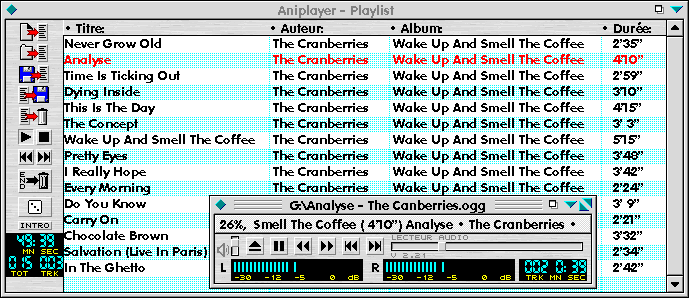
 The icons in the Playlist window allow you to:
  - Add a file to the list.
  - Add all the contents of a directory to the list.
  - Load a list; by default the list name is PLAYLIST.LST.
  - Save a list.
  - Remove the selected files or all files from the list in memory.

 The buttons of the Playlist window allow you to:
  - Start the list playback at the beginning or from the first file
    selected.
  - Stop the list playback.
  - Remove a file from the list at the end of playback.
  - Select random/sequential playback of the list.
  - Play the first 10 seconds of each file ('INTRO' function).
  - Jump to the previous file.
  - Jump to the next file.
 The last two buttons listed are also available in the main window.

 The mouse supports the following additional operations:
  - Move an entry in the list.
  - Double-clicking on a file causes that file only to be played; or, if
    playback is in progress, playback skips to the start of the file.
  - Using the right button, a popup menu allows you to:
    • Change the text displayed for the file (by default it consists
      of information about the file, for example Title · Author · Album
      for MPEG audio files).
    • Left align the text display.
    • Choose a font.
    • To jump at an entry into the list.
    • To find a text.
    • To find the next text.
    • Start the playback of a file, an entire list, or a list starting
      at the selected place.
    • Add, load or save the list under the current name or a new one.
    • Select/deselect the entire list.
  - Drag & Drop using multiple files is supported.
Finally, you can insert the file being accessed in the main window
into the Playlist, using the main window's popup menu.